Sales teams managing active pipelines face a consistent problem: not every deal or lead deserves equal attention, but figuring out which ones matter most requires reviewing data that is often spread across fields, notes, and activity logs. AI scoring inside Salesforce automates this analysis and surfaces a clear, explainable prioritization directly on the record.
The Problem with Manual Pipeline Prioritization
Without AI scoring, sales reps and managers typically rely on a combination of deal stage, gut feel, and whoever showed up loudest in the last pipeline review. This is inefficient for several reasons: it misses patterns in the data that aren't immediately obvious, it is inconsistent across reps, and it doesn't scale as the pipeline grows.
AI scoring applies consistent criteria to every record and produces an output that can be reviewed, questioned, and acted on. The goal is not to replace the sales rep's judgment but to give them a faster starting point backed by structured data.
How AI Lead Scoring Works in Salesforce
When a user triggers an AI scoring action on a Lead record, AI Engine reads the configured field values — company size, industry, job title, source, recent activity, and any custom qualification fields — and sends them to the configured AI model with a scoring prompt. The model returns a score (typically a numeric value or tier) and a written explanation of which factors drove the assessment.
This explanation is important. A score without reasoning doesn't help a rep decide what to do next. A score that says "this lead scores high because the contact is a VP-level decision-maker at a company in your target vertical with recent inbound activity" gives the rep something actionable.
How AI Opportunity Scoring Works in Salesforce
Opportunity scoring follows the same logic but draws on different data points: deal stage, close date, contract value, number of stakeholders identified, recent activity, open risks, and any custom fields your team uses to qualify deals. The AI model evaluates these against a scoring prompt and returns a structured assessment.
For pipeline reviews, this means managers can quickly identify which opportunities are at risk, which are well-positioned, and where reps should focus their time in the coming week — all without manually reviewing every record.
Scoring That Explains Itself
One of the common criticisms of AI scoring tools is that they produce a number without any transparency into how it was calculated. This makes adoption difficult because reps don't trust scores they can't interrogate.
AI Engine's scoring is configured through prompt templates that specify what the model should explain. The output typically includes the overall assessment, the top factors contributing to the score, any red flags or missing information, and recommended next steps. This makes the score useful regardless of whether the rep agrees with it — they can either act on it or push back with specific reasoning.
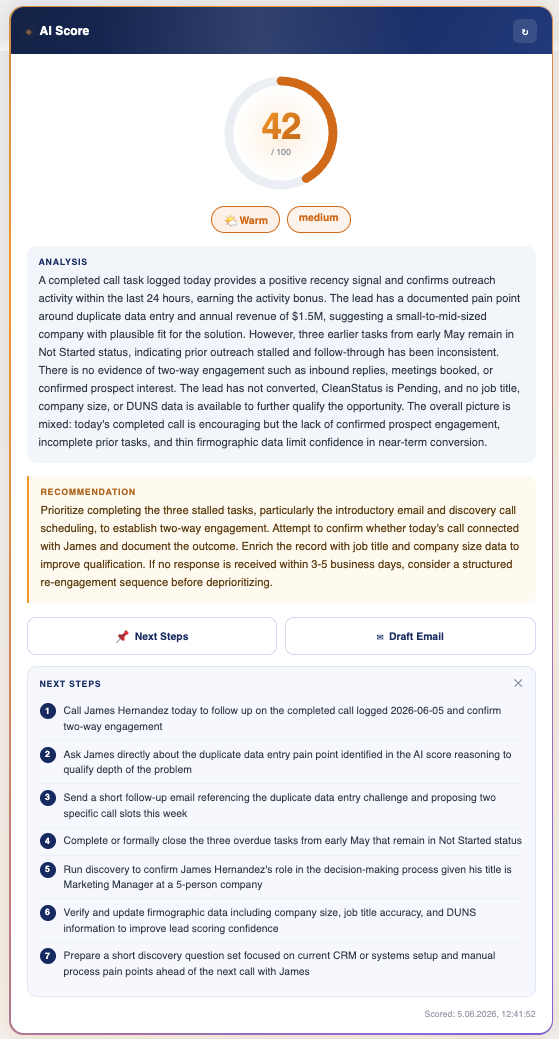
The scoring also reads the record's real activity history — logged calls, emails, meetings and their status — rather than guessing at engagement. If there are no activities, it says so and lowers its confidence instead of inventing a signal. A recently logged call nudges the score up; a string of untouched tasks pulls it down, and the explanation states exactly why.
From the same card, reps can act without leaving the record: Next Steps generates a concrete, ordered list of recommended actions, and Draft Email produces a ready-to-edit outreach message — both grounded in the record's own data and the score's reasoning.
Use Cases for AI Scoring in Sales Teams
Weekly Pipeline Reviews
Instead of manually reviewing every opportunity before a pipeline call, managers can run AI scoring across open opportunities and use the results to focus the conversation on the records that need attention — those with declining scores, missing information, or flagged risks.
Lead Prioritization for SDR Teams
SDR teams with high volumes of inbound or outbound leads benefit from consistent scoring that helps them sequence their outreach. Rather than working through a list in the order it was generated, they can prioritize based on fit, activity signals, and data quality.
Forecast Accuracy
When opportunities are scored consistently, forecast accuracy tends to improve. Deals that are overly optimistic relative to their actual data signals can be identified earlier, and the pipeline picture becomes more reliable for management reporting.
Implementation Inside Salesforce
AI scoring in AI Engine is configured as an action template. The admin specifies which Lead or Opportunity fields to include, how the scoring criteria should be structured in the prompt, and where the output should be displayed — either inline on the record page or logged as an activity. Users trigger the scoring action with a single click and receive results without leaving the record.
No black boxes: AI Engine's scoring prompts are configured by your admin team and visible to them. You control what criteria the AI applies, what it is instructed to explain, and how the output is formatted. The scoring logic is not hidden inside a proprietary algorithm.
Frequently Asked Questions
Can I customize what the AI scores against?
Yes. The scoring criteria are defined in the prompt template. Admins can specify the exact factors the AI should consider, how they should be weighted in the explanation, and what format the output should take.Does AI scoring update automatically?
AI scoring in AI Engine is triggered by users on demand, not run automatically on a schedule. This keeps the integration lightweight and avoids unexpected API costs from background processing.Can scoring results be saved to Salesforce fields?
AI Engine can be configured to write scoring output to Salesforce fields or log it as an activity, depending on how you want to track and report on the results.Which AI models work best for scoring?
GPT-4 class models from OpenAI and Claude from Anthropic both perform well for structured scoring tasks. The right choice depends on your existing vendor relationships and data handling requirements.See AI Engine on your own data
Native Salesforce package. Your own OpenAI, Claude or Azure key. 5-day free trial, no credit card.
Book a 30-min demo